AI Fruit Story Generator
Sign In
Tín dụng700 tín dụngKling 3.0

AI Fruit Story Generator

Write one short story beat or upload an optional original fruit reference, then generate a single 3–15 second clip. The starter prompt is fully editable, and 9:16 is preselected for vertical short-form video.

Optional Fruit Reference(0/1)

396 / 1.200

Âm thanh
Credits for this render700 tín dụng

AI Fruit Story Generator

Đoạn phim

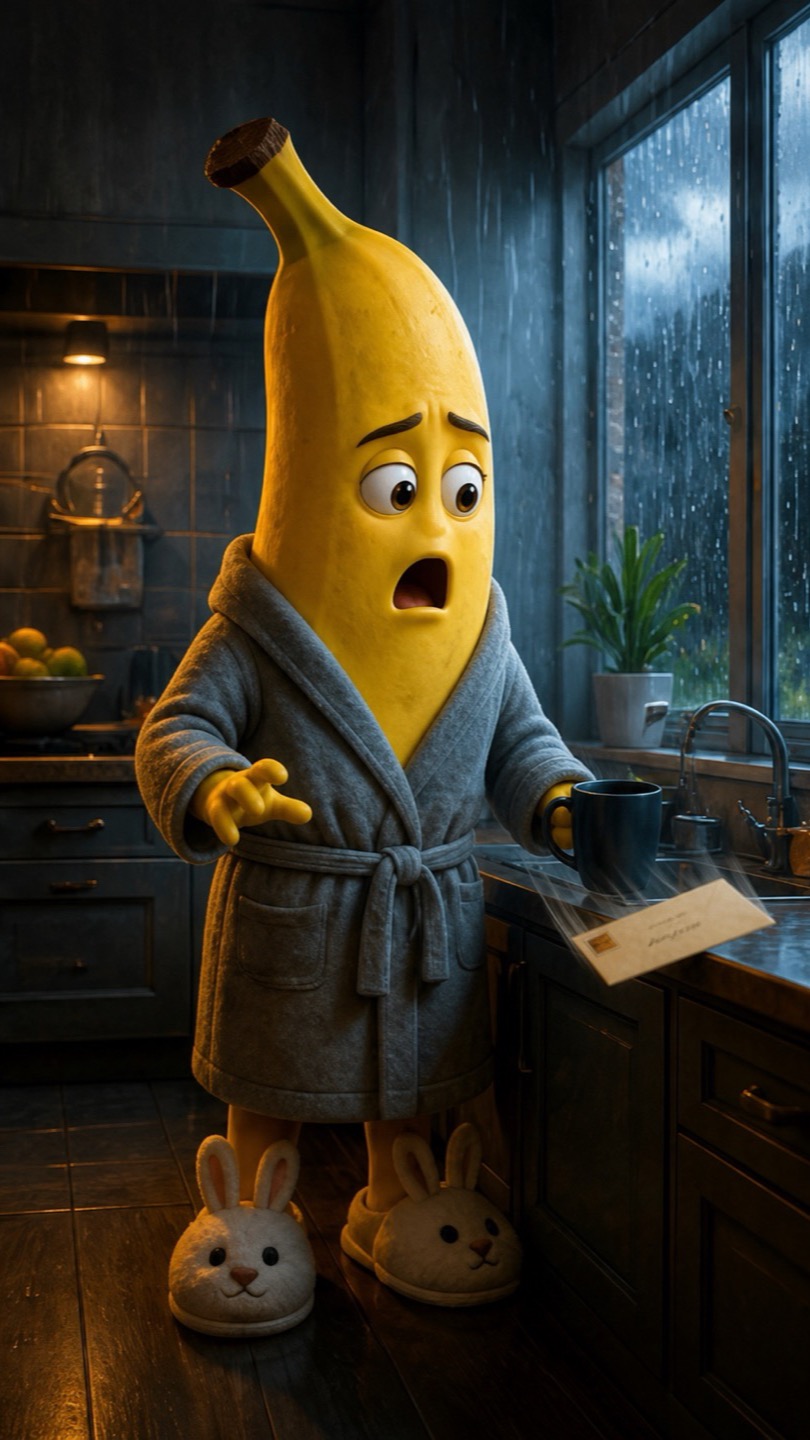
Original banana character waiting in a rainy kitchen as a reference frame
Reference frame
Banana character discovering a mysterious letter in a short fruit story frame
Story direction
Original banana character finding a letter in an AI fruit story scene

Make a fruit drama one short scene at a time

The AI fruit story generator is a focused text-to-video and image-to-video workflow for original anthropomorphic fruit characters. Start with a compact premise, define one visible action and one emotion, and make a vertical reaction, reveal, confession, or cliffhanger clip. Each render is one short scene, so you stay in control of the story instead of handing an entire episode to an opaque script system.

Three ways to frame a talking fruit video

These original storyboard previews show how a reference frame can guide a simple story beat. They are visual planning examples made from still frames, not claims of a one-click finished episode or guaranteed model output.

The letter under the teacup

A rainy kitchen, one recognizable banana character, and one small discovery create a complete beat without demanding several locations or a long screenplay. The prompt gives the model a stable setting, a prop, a sequence of two simple actions, and one readable reaction.

Edit This Direction

The unexpected interview question

A lemon character, one studio chair, and a nervous-to-brave expression create a concise fruit drama generator prompt. This format works well for confession clips, reaction hooks, mock interviews, and other moments where the emotion is more important than complex movement.

Try an Interview Beat

One brave step in the park

The pear scene uses a clear environment, a single found object, and a final physical choice. It demonstrates how an AI fruit video generator can visualize a small emotional turn while leaving the surrounding episode structure for the creator to plan and edit.

Build a Cliffhanger

Useful formats for an AI fruit video generator

Fruit characters are flexible visual shorthand: the shape reads instantly, while small human-like gestures can carry a joke, a problem, or a change of heart. Keep each clip centered on one beat and use the surrounding caption or edit to supply extra context.

Reaction and reveal hooks

Open with a fruit character noticing an object, hearing news, or seeing someone off-camera. A clean setup and readable reaction can create a strong first beat for vertical short-form content.

Confessions and mock interviews

Frame one character in a simple studio or kitchen setting, then describe the pause, expression, and gesture that follow an off-camera question. Add any precise spoken narration later in your editor.

Tiny emotional cliffhangers

Use a letter, key, paper airplane, photograph, or closed door as a clear prop. End the clip immediately after the character makes a choice, then generate the next scene as a separate prompt.

Original campaign concept tests

Food creators and marketers can explore an unbranded fruit mascot direction before commissioning a larger production. Keep characters original and review the final asset against your commercial and model-level usage requirements.

What the fruit drama generator does—and what still needs your edit

Picloft provides a real short-video generator with text and optional image input. It is best treated as a shot-making tool, not an automatic television studio.

One short clip per generation

Choose a duration from 3 to 15 seconds and generate one focused shot. Picloft does not automatically write and render a complete 10–30 second multi-scene episode. For a longer story, make each beat separately and assemble the selected clips yourself.

Your editable prompt, not an automatic screenplay

The page starts with an editable fruit-character prompt to remove blank-page friction, but you decide the character, setting, action, and emotional turn. There is no fixed character library and no promise that a full script will be written for you.

Reference guidance without a cross-episode guarantee

You can upload one original reference image for image-to-video. Reusing the same clear frame and description may improve continuity, but visual details can drift between separate generations and cross-episode character identity is not guaranteed.

Optional generated sound, not guaranteed dialogue

The sound switch asks a supported model to include generated audio. It does not guarantee intelligible speech, exact dialogue, a stable recurring voice, lip-synced lines, or a finished voiceover. Add precise dialogue, music, captions, and mixing during editing.

How to make an AI fruit story in five controlled steps

A disciplined shot-by-shot process is more reliable than asking one prompt to deliver an entire serial.

Choose one visible story beat

Define a simple beginning and reaction: a strawberry finds a key, a lemon hears a question, or a pear decides to follow a clue. Avoid packing several locations and time jumps into one prompt.

Start from text or one reference image

Leave the upload empty for text-to-video, or add one clear, original fruit-character image for image-to-video. Use an unobstructed subject, clean silhouette, and enough background space for motion.

Edit the default fruit-story prompt

Keep the character description, setting, action, emotion, lighting, and camera instruction specific. Remove any detail that cannot be seen within a short shot.

Set frame, duration, and optional sound

Use 9:16 for vertical feeds, 16:9 for landscape, or 1:1 for a square post. Pick 3–15 seconds and leave sound off when you plan to add exact dialogue or narration later.

Review, repeat, and assemble

Download the strongest clip, then create the next beat with a new prompt. Join clips, voiceover, captions, music, and transitions in your preferred editor to build the finished story.

Write prompts the model can stage in one shot

A practical prompt names the subject, setting, trigger, action, reaction, camera, and visual finish. That structure keeps a talking fruit video readable even when the clip is only a few seconds long.

Character plus distinctive visual detail

Describe an original fruit character and one or two stable details, such as a pear with a knitted scarf or a lemon wearing a small studio headset. Avoid protected brand mascots and famous fictional characters.

One trigger, one action, one reaction

Give the shot a visible causal chain: the character notices a clue, touches it, then reacts. This is easier to stage than a paragraph of backstory, several conversations, or a complete episode arc.

Camera and finishing direction

Specify one stable framing choice, such as a gentle push-in or locked medium shot, plus the lighting and mood. Ask for no text or logos when clean visual output matters.

Continue your short-video workflow

Use the broader Picloft video tools when you need a different model, a general generation workflow, or more inspiration before writing the next fruit-story beat.

AI Video Generator

Explore Picloft's general text-to-video and image-to-video workspace.

AI Video Effects

Browse focused effect and animation workflows for short-form experiments.

Seedance AI Video

Compare another prompt-led video model available in Picloft.

Video Showcases

See more visual directions and prompt ideas from Picloft.

AI Fruit Story Generator FAQ

Clear answers about prompts, reference images, duration, sound, and multi-clip storytelling.

What is an AI fruit story generator?

It is a focused AI video workflow for creating short scenes with original anthropomorphic fruit characters. In Picloft, you write or edit the prompt, optionally upload one reference image, choose the frame and duration, and generate one clip at a time.

Does Picloft automatically write a complete fruit drama?

No. Picloft supplies an editable starter prompt and generates a single short clip per run. It does not promise an automatic full screenplay or a finished multi-scene episode. Plan the beats yourself, generate them separately, and assemble the chosen clips in an editor.

Can I use a reference image for a talking fruit video?

Yes. Switch to image-to-video and upload one clear original fruit-character image. A reference can guide the initial appearance, but AI details may drift and the same character is not guaranteed to remain identical across separate generations.

Can the fruit characters speak exact dialogue?

Exact dialogue is not guaranteed. Optional model-generated sound may produce ambience or vocal-like audio, but it is not a dependable script, voiceover, recurring voice, or lip-sync system. Add precise spoken lines and captions during editing.

How long can each AI fruit video be?

The page offers durations from 3 to 15 seconds for one generated clip. If you want a longer story, create several focused shots and combine them manually.

Which aspect ratio works best for fruit drama videos?

Use 9:16 for Reels, Shorts, and other vertical formats; 16:9 for landscape video; or 1:1 for square posts. The generator defaults to 9:16 because many fruit-story concepts are designed as short-form hooks.

Is there a fixed fruit character library?

No. You describe your own original character or upload one original reference image. That gives you creative flexibility, but it also means Picloft does not promise a locked character catalog or automatic cross-episode consistency.

Create the first beat of your fruit story

Start with the editable prompt, generate one clear vertical clip, then return for the next scene when your story needs another beat.